RSS

Archive for March, 2010

This Is How We Do It

Posted by Anita Zein on March 31, 2010

It takes more than adjusting to new work culture and job experience.

Anita Zein profile pictureAnita Zein gives a sneak peek to the diverse work environment at Stampede that makes us the great team we are. Anita is the Project Manager at Stampede.

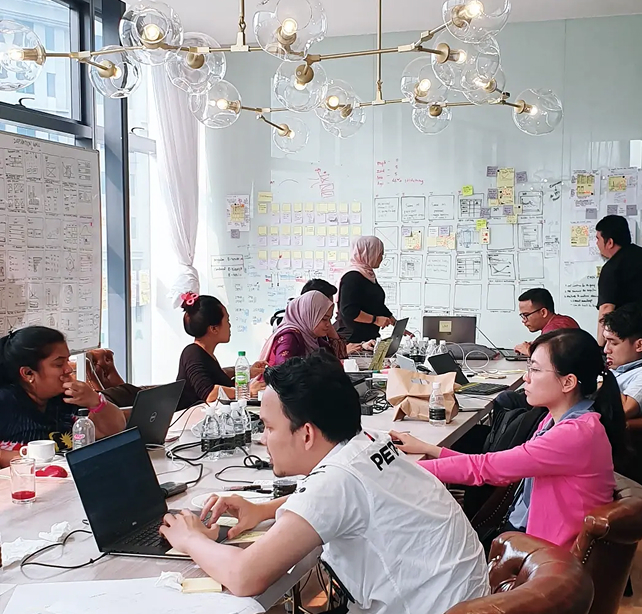
I’m sure many out there wonders about the unique work culture at Stampede. Working in an industry off-internet means putting yourself in a global environment. A team where people are not likely to be friends, not speaking the same language, sometimes people you won’t meet for the next few months.

In the beginning, the main challenge is knowing and understanding what your task entails and who are affected by it. Then as you move on being a more integral part of the team, you will find that it takes more than adjusting to new work culture and job experience. Communication is the main requirement of a team’s success and communicating with a team dispersed globally is in itself a great challenge.

Language

Each one of us comes from different background and have our very own native tongue. English is the predominantly first language here at Stampede but we make efforts to introduce new team members to the common English/web terminologies we use everyday. Most of us are semi-veterans in the field so our lingos can be overwhelming to the uninitiated. I converse often with new team members to give them confidence and shake away their fear of speaking in foreign language.

Timezone

Most of us at Stampede works on Eastern Standard Time, a 12-hour difference that makes daytime to our clients evening to us. Partly this is because we get to facilitate quicker response when communicating with the other side of the world. It is not an imposed rule though, everyone has the option to flexible work hours of their choice. Frankly, we’re all perfectly happy working nights anyway.

The time difference may seem extreme at first. There are meetings and voice conferences with international clients, rallying team members at 2am. But we have among the best clients a company can hope and a team to die for. Although like normal work hours, concentration does get pathetic around midnight. This is when having fun people to work with pays off.

Work Ethic

Work ethic is paramount here. Everyone must have sense of ownership towards the task at hand and take initiative to progress a project forward. We believe in diligence and hard work, the same goes for learning new things consistently. When things gets real hectic, it’s sometimes easy to forget that checking in with your fellow co-workers and clients is just as important as completing tasks on time. Having a strong set of ethical conduct in the background while the entire team is buzzing with work ensures that our Stampede values remain intact.

Culture

Our team is an ensemble of talent from different countries with different cultures and communication habits.

In Indonesia for example, we are used to an environment where people debate and discuss less. Conversation about a subject is done within a few small talks, nothing elaborate. It could come across as impolite or disrespectful at times, but it’s just the environment that demand fast result for all given instructions. No questions, no haggle, no debate.

It clearly differs from the culture in Stampede where communication thrives on everyone’s active participation. Major decisions are bounced around the team, analyzed and discussed. We share responsibilities and work together towards a goal. The ability to learn any cultural background and adapt quickly is therefore a necessity because effective communication ultimately leads to great work.

So you see, wherever we come from, we have the same opportunity here at Stampede. If you have interesting ways of handling diversity in your work environment, share them with us!

(photo by Barry Feldman)

Time difference is extreme between the team and the clients requires us to be ready when needed for meetings or communications in the form verbal with our international clients. And of course not every day, because the client also understands the condition.

At the beginning, very difficult to adapt to the hours worked in reverse. Adjust to the client working hours, with 12-hour time difference. With the time normally used for sleeping, now have to get up and work. And conversely, a break in the afternoon.

Concentration difficulties are common, nothing is easy. But if there’s a will, there is nothing impossible.

Posted in Team Add Comment »

Super Firefox Extensions

Posted by Syazwan Hakim on March 24, 2010

Firefox extensions page

“Nope, can’t do without them.”

Syazwan Hakim profile picture Syazwan Hakim discloses four of his most favourite Firefox extensions that no developers can ignore without losing sleep. Syazwan is the Front-End Developer at Stampede.

As a web developer, we are often caught in the situation where the things don’t go too well. Working or troubleshooting with normal HTML or table-base HTML takes times. To reduce time spent debugging (which inadvertently means more time spend writing ingenuous codes), I use Firefox extensions that greatly improve my web development experience and in turn, keep my sanity intact. Nope, can’t do without them.

So here’s a list of useful Firefox extensions that I personally vouch for.

Firebug

Firebug
The must-have extension for web developer across the globe. If I need to choose only one extension, there is no doubt it will be Firebug. With the capability to inspect or edit HTML and CSS, Firebug has saved me countless time troubleshooting codes. Firebug makes it simple to locate an HTML element buried deep inside mountains of sickly green and blue font-colored code. All you need to do is right click to select “Inspect Element” on whatever element you need, be it text, image, border, and so on. Firebug will find that element for you right away, no matter how deep the element was.

Firebug can also help tweak your CSS to perfection. When you click inspect element, you will see HTML tabs in your bottom left and CSS tabs in you bottom right. CSS tabs will tell you everything about the element style. At the CSS tabs, you can edit your CSS and view them right away. Pretty nifty.

Get Firebug extension here…

Page Speed

Page Speed
Released by Google, the tool is used to specifically improve you page load time, though you’ll need Firebug to make this add-on work. It will analyze the performance of a webpage during load time and there are any prevalent CSS errors. It will also recommend redundant elements or styling that can be removed to improve performance without affecting structure or style. While very useful to reduce bandwidth and hosting costs, it is ultimately an effective benchmarking tool that helps you deliver the page faster to your visitor’s devices.

Get Page Speed here…

Web Developer Tools

Web Developers Tools
An awesome solution packing so many useful tools meant for web developer’s use. Take for example the “Outline Tool” – viewing a website structure visually can not get easier than this. I use this option the most because it helps me troubleshoot block positions, especially when it comes to floating elements about with either relative, absolute, static or inherited positioning.

Web Developer Tools is also capable of real-time HTML editing. Gone were the days when editing a webpage means hitting the Dreamweaver deck (or worse, Frontpage), making changes to the code then saving the file before viewing the output on your browser. All you have to do now is to work the edit directly within Firefox, then if satisfied, copy and paste the modification into your web development application. Because the extension comes with options to hide images, css and javascript, we’re now able to test how resilient a web page is without the enriching elements.

Get the Web Developer Tools extension here…

HTML Validator

HTML Validator
The HTML Validator tool ensures that your code is semantic and built according to the W3C standards. It will find error in your HTML based on HTML Tidy and OpenSP library originally developed by W3C. Once an error is located, it will be classified into one of these three categories: “error” (the errors that Tidy didnt ), “warnings” ( Tidy can fix automatically ) and “optional” (accessibility warnings ). HTML Validator will also provide you useful information about a particular problem such as the line in your HTML where error occurred, what causes it and steps required to fix and validate the error.

Get the HTML Validator extension here…

The Complete List

For a complete list of Mozilla Firefox extensions, give the good guys a visit on this page. How about you? What’s your favourite Firefox extension of all?

Posted in Code Add Comment »

Useful MySQL Query for Search and Replace

Posted by Shaiful Borhan on March 13, 2010

Shaiful Borhan profile picture Need to perform a quick search and replace on your MySQL database records? Take a seat and read on, casually. Shaiful is the Web Analyst and Developer at Stampede.

When working with databases, one of the tasks that may popped up every once in a while is the need to replace some little snippet of text and all its occurrence throughout the table, to a different text. Simple enough to do manually, but too time-consuming. Thankfully, there’s a handy query to make this task a breeze.

UPDATE `table_name` SET `field_name`= REPLACE (`field_name`, 'search for', 'replace to');

The query is pretty self-explanatory. As with all UPDATE operation, you can add a WHERE clause to have more control over the outcome of the query.

The most common scenario where I found this to be useful is when moving a Wordpress installation from a development server over into a live server, where I have to replace all occurrence of the former URL to the latter in order to ensure images in posts are pointing correctly. Here’s how the query may look.

UPDATE `wp_posts` SET `post_content`= REPLACE (`post_content`, 'http://devserver.com/', 'http://liveserver.com/');

Just run it using your favorite database admin tool and you’ll be glad in no time. Have a nice day!

Posted in Code Add Comment »